Can Your Office Chair Cause Knee Pain? A Complete Ergonomic Guide for 2025
Can Your Office Chair Cause Knee Pain? A Complete Ergonomic Guide for 2025
Can office chair cause knee pain? Yes. Improper chair setup ranks among the leading causes of workplace musculoskeletal disorders, affecting 40-80% of office workers. This guide covers the biomechanics behind chair-related knee pain, five warning signs to watch for, and practical fixes you can implement today.
How Office Chairs Cause Knee Pain: The Biomechanics Explained
Your knee joint absorbs compressive forces whenever you sit, and incorrect positioning amplifies that stress significantly.
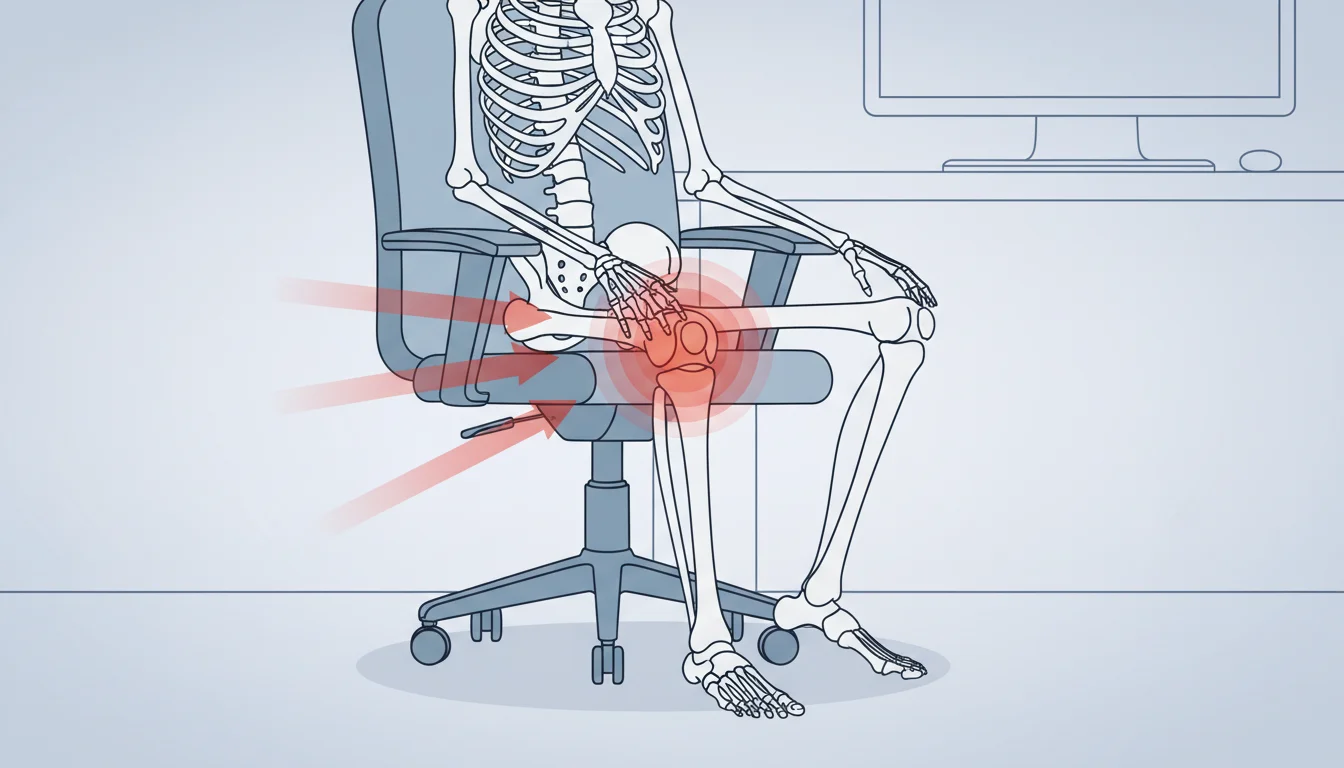
When your seat sits too high, your feet dangle. This transfers your body weight directly onto the back of your thighs, compressing blood vessels and nerves behind the knee. A seat that's too low creates the opposite problem: your knees bend past 90 degrees, increasing pressure on the patellar cartilage beneath your kneecap.
Seat depth plays an equally critical role. A seat pan that extends too far forward presses into the popliteal area behind your knees, restricting blood flow and irritating the tendons running through that space.
The chain reaction starts at your hips. Poor lumbar support causes your pelvis to tilt backward. Your thighs rotate inward. Your knees follow, creating misalignment that stresses the joint with every hour you sit.
Here's what surprised me during research: knee cartilage has no blood supply. It depends entirely on movement to circulate synovial fluid for nourishment. Eight hours of static sitting essentially starves your cartilage. [Medical News Today] confirms this mechanism drives many cases of desk-related knee pain.
5 Signs Your Office Chair Is Causing Your Knee Pain
The pattern matters more than the pain itself. Chair-related knee pain follows predictable indicators that distinguish it from injury or arthritis.
| Sign | What It Feels Like | Why It Happens |
|---|
| Pain worsens through workday | Dull ache intensifies by 3-4pm, improves on weekends | Cumulative pressure from sustained poor positioning |
|---|---|---|
| Stiffness when standing | Knees feel locked, need 10-15 seconds to straighten | Prolonged flexion reduces synovial fluid circulation |
| Numbness or tingling | Pins and needles in legs, around kneecap | Nerve compression from seat edge or poor circulation |
| Pressure marks on thighs | Red lines or indentations from seat edge | Seat depth too long for your leg length |
| Localized pain patterns | Front of knee (patellofemoral) or behind knee (popliteal) | Specific positioning errors create predictable pain locations |
Track your symptoms for one week. Note pain levels at 9am, 1pm, and 5pm. If the pattern shows clear workplace correlation, your chair setup needs attention before the damage compounds.
The Perfect Chair Setup: A Step-by-Step Measurement Guide
Proper ergonomic setup requires specific measurements, not guesswork or comfort-based adjustments.
Seat Height Formula:1. Sit with your back against the chair
2. Place feet flat on the floor
3. Measure knee angle with a goniometer app or protractor
4. Target: 90-110 degrees at the knee joint
Seat Depth Check:1. Sit fully back in the chair
2. Place your fist behind your knee
3. Check the gap between the seat edge and the back of your knee
4. Target: 2-4 finger widths (approximately 5-10cm)
Desk-to-Chair Ratio:1. Adjust chair height first using the formula above
2. Set desk height so elbows rest at 90 degrees
3. Keep shoulders relaxed, not shrugged
4. If your desk is non-adjustable, modify chair height and add a footrest
| Measurement | Optimal Range | Common Mistake |
|---|
| Knee angle | 90-110° | Too acute from low seat |
|---|---|---|
| Seat gap | 2-4 fingers | No gap, edge presses into legs |
| Feet position | Flat on floor | Dangling or tucked under |
| Thigh position | Parallel to floor | Sloping down toward knees |
Armrest height affects this equation indirectly. Set armrests so your shoulders stay relaxed while typing. Hunched shoulders cause you to lean forward, shifting weight onto your thighs and increasing knee pressure. [Vitrue Health] reports that 65% of desk workers develop musculoskeletal issues from these compounding alignment errors.
Budget-Friendly Fixes for Your Current Chair
Replacing your office chair costs $200-800 for quality ergonomic models. These modifications cost under $50 and address the most common knee pain triggers.
- Footrest ($15-40): Essential if your chair cannot lower enough for proper knee angle. Adjustable-height models let you dial in exact positioning. Your feet should press firmly, not rest limply.
- Seat cushion ($25-45): Memory foam or gel cushions effectively shorten seat depth while adding pressure distribution. Place the cushion toward the back of the seat pan.
- Lumbar roll ($10-25): A rolled towel works temporarily. Proper lumbar support keeps your pelvis neutral, which maintains correct thigh and knee positioning.
- Seat wedge ($20-35): Angled cushions tilt your pelvis forward slightly, reducing pressure behind the knees and promoting better spinal alignment.
When does replacement make more sense? If your chair lacks height adjustment, has a non-adjustable seat pan, or the cushion has compressed beyond recovery, modifications cannot compensate. Calculate total modification costs against a quality ergonomic chair purchase. Three modifications at $30 each approaches entry-level ergonomic chair territory.
Ergonomic Chair Features That Protect Your Knees
Not all adjustable chairs protect knee health equally. These specific features directly impact lower limb comfort during prolonged sitting.
| Feature | What to Look For | Why It Matters for Knees |
|---|
| Seat height range | Pneumatic cylinder with 4-6 inch range | Accommodates different desk heights and leg lengths |
|---|---|---|
| Seat depth adjustment | Sliding seat pan or multiple depth settings | Prevents popliteal compression regardless of thigh length |
| Waterfall edge | Rounded, downward-sloping front edge | Eliminates pressure point behind knees |
| Cushion density | Medium-firm foam, 3+ inches thick | Prevents bottoming out while distributing weight |
| Tilt mechanism | Synchronized or knee-tilt design | Allows position changes without losing proper alignment |
Standard office chairs typically offer height adjustment only. Mid-range ergonomic chairs ($300-500) add seat depth adjustment. Premium models ($500+) include waterfall edges and advanced tilt mechanisms.
Standing desk converters offer an alternative approach. Alternating between sitting and standing eliminates prolonged static positioning entirely. The tradeoff: standing creates its own fatigue patterns if overdone.
Exercises and Stretches to Relieve Office-Related Knee Pain
Movement breaks work better than any chair modification. Your knee cartilage requires motion to receive nutrients.
Desk-Side Stretches (30 seconds each):- Seated quad stretch: Pull one ankle toward your buttock while sitting, then hold
- Hamstring stretch: Extend one leg, flex your foot, and reach toward your toes
- Figure-four stretch: Cross your ankle over the opposite knee and lean forward gently
- Seated leg extensions: Straighten your leg parallel to the floor, hold 5 seconds, repeat 10 times
- Ankle rotations: 10 clockwise, 10 counterclockwise for each foot
- Heel raises: Lift heels off the floor, hold 3 seconds, repeat 15 times
Strengthening exercises outside work hours accelerate recovery. Bodyweight squats, lunges, and step-ups build the quadriceps and hamstrings that support your knee joint during seated hours.
When to See a Doctor About Knee Pain
Ergonomic corrections resolve most chair-related knee pain within 2-3 weeks. Persistent or worsening symptoms indicate something beyond positioning.
Seek evaluation if you experience:- Swelling, warmth, or redness around the knee
- Pain that wakes you at night
- Locking, catching, or giving way sensations
- No improvement after 3 weeks of ergonomic corrections
- Pain accompanied by fever or unexplained weight loss
Chair-related pain typically affects both knees somewhat equally and follows workday patterns. Unilateral pain, sudden onset, or trauma history suggests different causes—such as meniscus tears, ligament damage, or arthritis—requiring imaging and professional diagnosis.
Ask your doctor: "Could my workstation setup contribute to this?" Request specific recommendations for chair height and positioning. Some physicians provide ergonomic assessment referrals covered by insurance.
FAQ
Does sitting cross-legged cause knee pain?
Yes. Crossing your legs rotates your pelvis, misaligns your spine, and creates uneven pressure on knee joints. This position also compresses the peroneal nerve behind your knee, causing numbness. Keep both feet flat on the floor or footrest.
How long does it take for ergonomic changes to relieve knee pain?
Most people notice improvement within 1-2 weeks of proper chair adjustment. Complete resolution typically takes 3-4 weeks. If pain persists beyond one month despite correct setup, consult a healthcare provider.
Is a kneeling chair better for knee pain?
Kneeling chairs reduce lower back strain but transfer pressure to your shins and knees. They work poorly for existing knee pain. Traditional ergonomic chairs with proper adjustment provide better knee support for most users.
Should I use a standing desk if my chair causes knee pain?
Standing desks help by eliminating prolonged sitting, but standing all day creates different problems. Alternate between sitting and standing in 30-60 minute intervals. This combination protects both your knees and your lower back.
What knee angle is best for sitting?
Target 90-110 degrees at the knee joint. Angles below 90 degrees compress the joint excessively. Angles above 110 degrees require seat heights that often compromise desk ergonomics. Use a smartphone goniometer app to measure your current angle.
Does body weight affect chair-related knee pain?
Yes. Higher body weight increases compressive forces on knee cartilage during sitting. Weight management reduces joint stress. Additionally, heavier individuals need chairs with higher weight capacities and denser cushioning to maintain proper positioning.